

“Can your LinkedIn joining date be worked out from your profile date?”
I’ve seen this question a couple of times on Threads from people talking about possible ageism during the hiring process.
Your LinkedIn profile URL does not directly reveal the age of your LinkedIn account, but there are indirect ways of working out the age. So, the answer is … yes, sort of.
This is my LinkedIn profile URL:
It’s just my name, and there’s no way you’d know just from looking at that address that I set up my LinkedIn account in 2008. You definitely wouldn’t know that I didn’t really become active on LinkedIn until 2017 (all those wasted years!).
So, how would you work out the age of my account?
Method 1: look up “About this member”.
The easiest way is to visit the LinkedIn profile, click More and click the About this member menu, which shows the month and year when I joined LinkedIn.
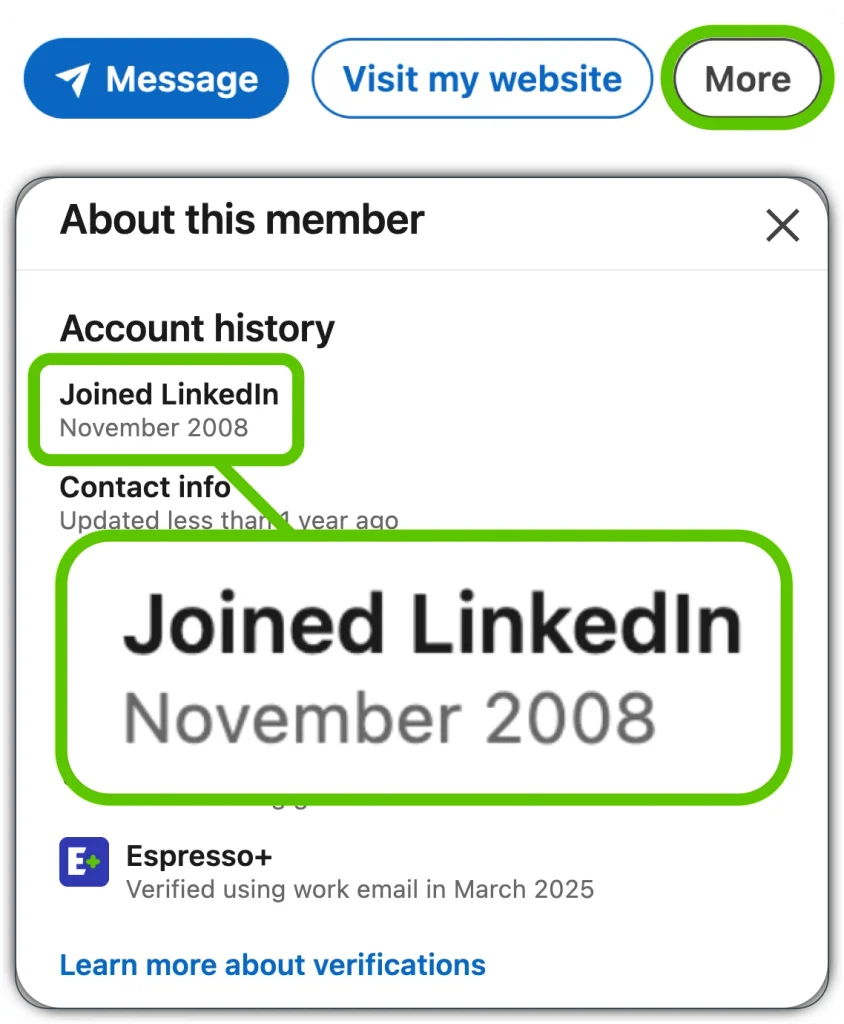
That’s simple enough for a human to do but a little more challenging for an automated tool to grab that info.
Automation is relevant to consider here, because if there is any link to candidate processing for hiring purposes, you’d guess that a company would be assessing lots of candidates and hence wanting to do some automated screening to consider and eliminate people based on their age.
To be clear, I’m not saying that’s ethical – it definitely isn’t – but I’m simply looking at what’s possible with the tech to see whether companies could be doing something like this.
The other method is more open to programmatic automation.
Method 2: look up memberId in source code.
When a LinkedIn profile is loaded into a browser, the underlying HTML code that is used to build the page contains several memberId codes. If you copy the page source into a text editor, and search for memberId, the final search result will be that person’s LinkedIn member number.

LinkedIn member numbers are assigned uniquely when someone joins LinkedIn and therefore can be correlated very closely with a joining date. Mine is 34831891.
I’ve mapped out how many members LinkedIn had on certain dates, via my LinkedIn membership tracker. You can work out the rest from that.
There’s one bonus way to look up your own LinkedIn member number, and that’s via the LinkedIn data archive. If you look at the files downloaded, your number is shown on some of the file names.

If a company were really doing this, I would say it would be more effective for them to check things like education graduation dates, as that gives a pretty good estimate of how old someone is. A more sophisticated system would look at multiple factors and have some sort of confidence score for a person’s age range.
So, there’s no way of calculating someone’s LinkedIn joining date by their profile URL alone, but there are two methods above where it can be done indirectly.
Contact me on LinkedIn if you have any other nerdy questions like this!