
- Introduction
- What is LinkedIn verification?
- Does verification matter?
- Verification when names don’t match
- Verification via a company page
- Verification via an educational institution
- Data privacy concerns when verifying
- “Verified on LinkedIn” on external platforms
- Verification and the Online Safety Act
- Let’s wrap up
Introduction.
Verification is LinkedIn’s attempt to build trust with users and external partners by verifying that people and companies are who they say they are.
Verification came to LinkedIn in 2023.
In late April 2025, LinkedIn confirmed that there were 80 million verified accounts on the platform.
What is LinkedIn verification?
LinkedIn allows personal profiles and company pages to display a grey shield icon next to the name to signify that a real, verified identity is associated with the account.
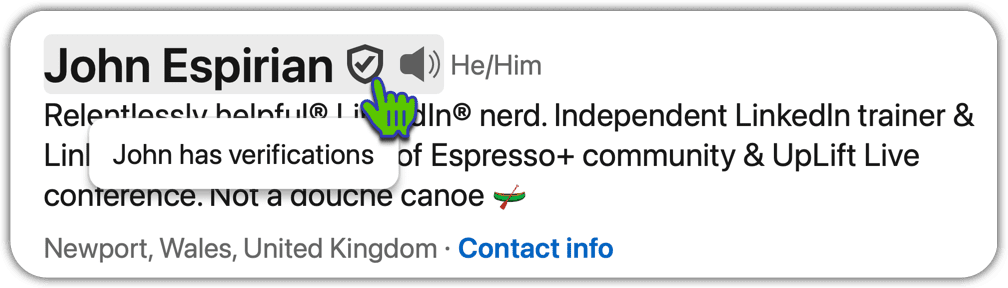
The main way for personal profiles to become verified on LinkedIn is for the account-holder to go through an identity check with one of LinkedIn’s third-party verification partners.
Currently, the main verification partners are CLEAR, Persona and DigiLocker.
Official LinkedIn help articles:
- Identity verification via CLEAR
- Identity verification via Persona
- Identity verification via DigiLocker (India)
Personal identity verification currently requires the name on a personal LinkedIn profile to be checked against a recognised state-issued document such as a passport.
The verification process for personal profiles requires the use of the LinkedIn mobile app.
However, there is an alternative method of verification – via a company page – which means that you don’t need to use the mobile app or upload any passport data.
Does verification matter?
Probably not for now. As of mid 2025, LinkedIn verification won’t help your content be seen more.
Things may change if LinkedIn starts highlighting users’ verified status in the feed. If that happens, people might start paying more attention to verified users.
Right now, your verified badge will appear next to your name on your posts that appear in the main feed – BUT if you have a Premium account, your gold badge will appear instead of the verified shield. This is because LinkedIn displays at most one badge next to your name in the feed.
Perhaps in the longer term, people who haven’t verified might be seen as possible AI bots and hence ignored – but that feels like a stretch.
An intangible benefit to verifying your account is the positive perception it may give to some of your profile viewers. It’s hard to quantify this.
LinkedIn doesn’t automatically verify the profiles of their members who have a Top Voice badge. This feels weird, as those people have already gone through some human scrutiny before being awarded a badge.
Verification when names don’t match.
The most common issue people have when they’re unable to verify their LinkedIn personal profile is that the LinkedIn name doesn’t match what’s on the passport.
LinkedIn have said that the requirements are quite strict and that they’re OK with some people who really ought to be able to verify not actually being able to do so. I don’t think that’s fair but those are the rules.
A relatively new option as a workaround to this is for people to agree to display their passport name alongside their common name on their LinkedIn profile. Here’s an example:

It’s not the most elegant look but if you’re sure you want a verification shield then you might have no other choice.
Verification via a company page.
This official help page covers how to verify via your LinkedIn company page.
I like this route because it means you can end up with a verification on your personal profile even without having to upload any personal ID.
The downside is that there seems to be a massive wait before companies are verified. One of my company pages is verified but the other two have been in a queue for more than 6 months(!)
To request verification for your company, visit the company page as a super admin and make the request via Settings | Verification controls.
Once that’s done and you eventually receive confirmation from LinkedIn via email (again, note that this could take months), the video below shows the process for adding that company verification to your personal profile.
Anyone who is an employee of a verified company can use this method to get their own verification on their personal profile. It just requires patience – I’ve no idea why the backlog of company verifications is apparently so long.
Verification via an educational institution.
These are the official help pages about how verify via an educational institution: page 1 & page 2
This route isn’t open to most LinkedIn users, as few educational institutions have been verified.
Data privacy concerns when verifying.
Some people have refused to verify their LinkedIn personal profile because they’re concerned that doing so will give LinkedIn their passport details.
According to LinkedIn, this isn’t the way things are supposed to work. The personal identity verification process happens directly between you, the user, and the third-party identification partner (such as CLEAR or Persona).
Once the process is complete, the identification partner sends a signal back to LinkedIn to indicate whether the identity is confirmed and hence whether a verification badge should be issued.
The mechanism for this is likely to match the existing process for handling the unlocking of accounts.
Here’s what LinkedIn say about this in their official help file: Verify your identity to recover account access
Although you’ll access Persona’s verification process through the LinkedIn app, Persona will be collecting the personal data required to verify your identity and such collection is done pursuant to Persona’s policies. Persona only shares information about you with LinkedIn if you consent to the sharing. Persona will ask for your permission to send the following data to LinkedIn:
- Verification result
- Full name
- Year of birth
- City, state/province, country
- ID type and issuer
- Redacted copy of ID, with only the full name and face portrait being visible
LinkedIn doesn’t receive your biometric data or numbers, expiry dates, or issue dates associated with your ID.
LinkedIn processes this data for the purpose of account recovery and retains it only while your account issues are being resolved. They’re generally permanently deleted within 14 days of submission. We may retain non-identifying data about your ID for fraud prevention purposes.
As ever, the question with these things is, do you believe that the process works the way LinkedIn say it does?
I don’t think we have anything like as much privacy online as we think we do, so it doesn’t concern me to go through verification hoops like this.
And besides, my clients and community want to know how this stuff works, so it wouldn’t feel right for me to bow out of testing it for myself and reporting on it (remember that I’m an independent LinkedIn consultant, so I can give you my honest thoughts about what works and what doesn’t).
“Verified on LinkedIn” on external platforms.
In April 2025, LinkedIn announced that they are extending the remit of verification so that your verified identity on LinkedIn can be used as a trust signal on other platforms. See announcement
Verification and the Online Safety Act.
The UK’s Online Safety Act came into effect on 25 July 2025.
Although this isn’t directly relevant to LinkedIn verification, I thought it was interesting to see whether the debate around the perceived risks around online identity verification would change people’s thinking about verifying their LinkedIn account.
I ran a LinkedIn poll and the results suggest that little has changed.

Let’s wrap up.
Currently, verification on LinkedIn won’t bring you any tangible benefits, though there’s arguably some kudos to having a grey shield next to your name, and perhaps that will be of more relevance in the future.
When the process works, it’s pretty quick and easy, but that’s not enough to stop many from being hesitant to hand over their data.